Mastering Grunge Acrylic Horizontal Brush Strokes: A Guide to Vector Texture
In the ever-evolving world of digital design, there is a perpetual tension between clean precision and organic authenticity. While modern software allows for pixel-perfect geometry, human eyes are naturally drawn to the imperfect, the tactile, and the raw. This is where grunge acrylic horizontal brush strokes enter the creative conversation. These elements serve as a bridge between the digital workspace and the physical art studio, offering designers a way to inject handmade warmth into vector-based projects without the mess of actual paint.
Understanding how to effectively utilize these textured elements can transform a flat, sterile composition into something with depth, history, and emotional resonance. Whether you are a seasoned graphic designer or a DIY enthusiast exploring Adobe Illustrator for the first time, mastering the application of vector acrylic strokes is a skill that adds significant versatility to your creative toolkit.
The Appeal of "Perfectly Imperfect" Design
To understand the significance of grunge acrylic strokes, we must first explore why texture matters in visual communication. In traditional art, the medium carries as much weight as the message. The ridges of oil paint, the bleed of watercolor, and the streaks of acrylic tell a story of process and human touch. When design moved almost entirely to screens, much of this sensory information was lost to smooth gradients and solid fills.
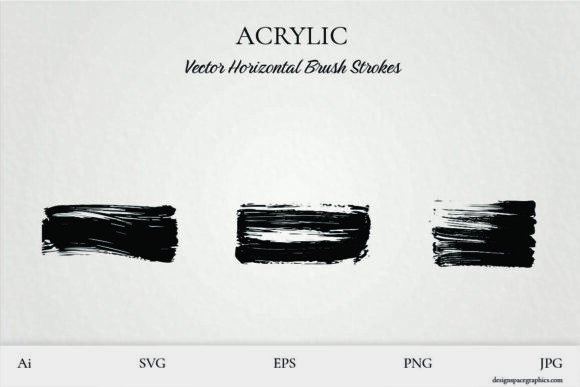
Grunge acrylic horizontal brush strokes reclaim that lost sensory detail. They are characterized by their perfectly imperfect nature. Unlike a standard digital brush that repeats the same pattern endlessly, high-quality vector stroke elements capture the erratic behavior of real paint. They feature dry edges, varying opacity, and directional streaks that mimic the resistance of a brush against canvas. This authenticity is crucial because it prevents designs from looking overly manufactured. In an era of AI-generated imagery and automated templates, the deliberate use of raw, expressive textures signals intentionality and craftsmanship to the viewer.
Vector vs. Raster: Why Format Matters
A common misunderstanding among beginners is assuming all brush stroke graphics are created equal. Many free resources online offer rasterized (pixel-based) images of paint strokes. While these can be useful, they lack the flexibility required for professional or scalable work. This is where the distinction of vector acrylic elements becomes vital.
Vector graphics are defined by mathematical paths rather than pixels. When you utilize a set of vector horizontal brush strokes in formats like EPS, SVG, AI, or editable PDF, you gain distinct advantages:
- Infinite Scalability: You can stretch a horizontal stroke across a business card or a billboard without losing edge definition or introducing pixelation.
- Color Customization: Because the stroke is a vector shape, you can change its color instantly within Adobe Illustrator to match any brand palette, rather than being stuck with the original painted hue.
- Editability: Advanced users can manipulate the anchor points of the stroke itself, altering the curve or thickness to fit a specific layout constraint.
- Transparency Control: Vectors allow for seamless blending modes and opacity adjustments without the gray halos often seen when masking raster images.
While JPG and PNG files are excellent for quick mockups or web-only use, investing in or utilizing vector source files ensures your grunge elements remain versatile assets for years to come.
Practical Applications Across Creative Disciplines
The horizontal orientation of these specific brush strokes is not arbitrary. Horizontal lines suggest stability, calm, and grounding. They provide a natural resting place for the eye and serve as excellent structural elements in composition. Here is how different creators apply these tools in modern workflows:
Graphic Design and Branding
In branding, grunge acrylic strokes are often used to soften corporate identities. A tech startup might use a sleek sans-serif logo but underline it with a rough, teal acrylic stroke to convey approachability and creativity. The horizontal format works exceptionally well as a divider between sections on a website, a background element behind headline text, or a framing device for photography. It adds a "human" layer to data-driven or minimalist layouts.
Merchandise and Apparel Design
For those creating trendy t-shirts, sweatshirts, or tumblers, texture is everything. Flat prints on fabric can sometimes look cheap or plasticky. By incorporating rich, textured acrylic strokes, designers simulate the look of screen printing or hand-painting. The horizontal flow complements the natural lines of garments and drinkware, wrapping around curves more naturally than vertical elements. Because these vectors are scalable, a designer can create one master artwork and adapt it for a mug, a tote bag, and a hoodie without redrawing the texture.
Digital Art and Scrapbooking
Digital artists and scrapbookers use these strokes for layering. Much like traditional mixed media, digital compositions benefit from foreground and background textures. A semi-transparent horizontal stroke can unify disparate photos and text elements, acting as visual glue. For scrapbookers, these elements offer the aesthetic of torn paper and paint without the archival risks or physical cleanup associated with real media.
Technical Tips for Implementation
Having the assets is only half the battle; knowing how to wield them separates novices from pros. If you are working in Adobe Illustrator or similar vector software, consider these best practices to maximize the impact of your grunge acrylic elements.
- Utilize Blending Modes: Do not simply place the stroke on top of your background. Experiment with Multiply, Overlay, or Soft Light blending modes. This allows the texture of the underlying layers to show through the paint, creating a more integrated, realistic composite.
- Create Custom Brushes: One of the most powerful features of vector stroke sets is the ability to convert them into Illustrator brushes. By saving a horizontal stroke as an Art Brush, you can draw new paths that automatically adopt that specific grunge texture. This allows you to create custom shapes while maintaining the consistent painterly vibe of the original set.
- Mind the Negative Space: Grunge textures are visually heavy. Use horizontal strokes to balance busy areas of your design against open space. Overusing texture can lead to visual noise; let the strokes breathe so their character remains distinct.
- Layer for Depth: Rarely does a single stroke look authentic on its own. Layer two or three strokes with varying opacities and slightly different colors. This mimics the way real acrylic paint builds up in layers, enhancing the 3D illusion.
Educational Value and Skill Development
Beyond immediate project utility, experimenting with grunge acrylic vectors serves an educational purpose. For students and self-taught designers, analyzing these elements teaches the anatomy of texture. By deconstructing how a vector artist translated a physical brush movement into bezier curves, learners gain insight into both traditional art theory and digital technical proficiency.
Furthermore, these elements encourage a hybrid mindset. They remind us that digital tools do not have to erase tradition; they can amplify it. In educational settings, using such resources helps students understand that "digital art" is not a monolith. It encompasses a spectrum ranging from hyper-realism to abstract expressionism, and understanding where grunge texture fits on that spectrum is key to developing a mature design voice.
Embracing the Mess Without the Cleanup
Ultimately, the value of a set of 3 Vector Acrylic Horizontal Brush Stroke Elements lies in the freedom they provide. Creativity often involves a desire to break rules, to smear, to splash, and to experiment. In a professional environment with tight deadlines, or for hobbyists with limited space, actual painting isn't always feasible. These digital assets democratize the grunge aesthetic, making it accessible to anyone with a computer and an idea.
Whether you are designing eye-catching wall art, layering texture in digital illustrations, or building a merchandise line for your online shop, these strokes offer a foundation of raw expression. They allow you to maintain the efficiency of vector workflows while celebrating the beautiful chaos of analog art. Get inspired, get messy without the cleanup, and discover how the perfectly imperfect stroke can elevate your next creative endeavor from good to unforgettable.