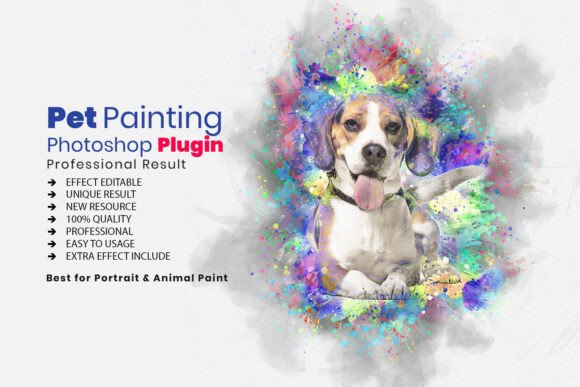
Transforming Pet Photography into Fine Art with the Pro Pet Watercolor Art Plugin Action
The intersection of digital photography and traditional artistic expression has created new opportunities for pet owners, professional photographers, and graphic designers. While standard photo editing focuses on color correction and retouching, a growing demand exists for stylized imagery that mimics hand-painted mediums. The Pro Pet Watercolor Art Plugin Action addresses this specific niche by automating complex painting techniques within Adobe Photoshop. This tool bridges the gap between technical digital manipulation and organic artistic aesthetics, allowing users to convert standard animal portraits into fluid, textured watercolor compositions without requiring years of traditional painting experience.
Technical Composition and File Architecture
Understanding the underlying structure of this plugin is essential for maximizing its potential. Unlike simple filters that apply a uniform overlay, the Pro Pet Watercolor Art Plugin Action utilizes a multi-layered approach involving three distinct file formats working in concert. This architecture ensures that the final output retains high resolution and editability.
- Photoshop Atn (Action) File: This is the core executable script. It records and replays a precise sequence of commands, layer creations, mask applications, and filter adjustments. The action handles the heavy lifting of separating the subject from the background and applying the base painterly effects.
- ABR Brush File: Watercolor relies heavily on brush texture to simulate paper grain and pigment dispersion. The included ABR file contains custom-designed brushes that replicate the irregular edges and wet-on-wet bleeding characteristic of real watercolor paints, preventing the "plastic" look often associated with digital art.
- PAT Pattern File: Texture is what sells the illusion of traditional media. The PAT files provide authentic watercolor paper textures that interact with the blend modes of the action, adding tactile depth to the digital canvas.
This tripartite file system allows for non-destructive editing. Because the action generates organized layers rather than flattening the image immediately, users can revisit specific stages of the transformation to refine details or adjust opacity long after the initial one-click process is complete.
Workflow Integration for Professional Photographers
For professional pet photographers, consistency and speed are paramount. Clients often request artistic variations of session photos for wall art, calendars, or greeting cards. Manually painting these effects can take hours per image, making them cost-prohibitive for many clients. Integrating the Pro Pet Watercolor Art Plugin Action into a post-production workflow solves this scalability issue.
The action serves as a foundational base layer. A photographer can run the action to achieve 80% of the desired effect in seconds. The remaining 20% involves manual refinement using the included brushes to enhance specific features like eyes, nose highlights, or fur direction. This hybrid workflow maintains the efficiency of automation while preserving the unique character of each animal. Furthermore, the inclusion of 20 unique color adjustment presets allows professionals to offer a diverse product suite. A single photo session can yield warm sepia tones, cool monochromatic blues, or vibrant full-spectrum interpretations, effectively multiplying the value delivered to the client without additional shooting time.
Applications in Personalized Merchandise and Gifting
Beyond professional photography, this tool has significant relevance for the personalized gift market and hobbyist creators. The emotional connection people have with their pets drives a massive market for custom artwork. However, commissioning a traditional watercolor artist is expensive and time-consuming. This plugin democratizes access to high-quality pet portraiture.
Print-Ready Wall Art
Watercolor aesthetics translate exceptionally well to physical prints. The soft edges and organic textures hide pixelation artifacts that might be visible in sharp digital enlargements. Users creating wall art should utilize the high-resolution capabilities of the action. By maintaining the original file dimensions and leveraging the PAT texture files, the resulting image possesses enough detail for large-format printing. The fluid nature of watercolor also complements various framing styles, from rustic wood to modern minimalist white mats.
Greeting Cards and Stationery
For creators designing pet-themed stationery, the action provides a cohesive visual style across multiple products. The ability to batch-process images with consistent color adjustments ensures that a set of thank-you cards or holiday greetings looks professionally curated. The delicate texture added by the plugin prevents designs from appearing flat when printed on matte cardstock, enhancing the perceived quality of the merchandise.
Educational Value and Skill Development
While marketed as a time-saving tool, the Pro Pet Watercolor Art Plugin Action also functions as an educational resource for aspiring digital artists. Reverse-engineering the results of an automated action offers insight into advanced Photoshop techniques. By observing how the action constructs layers, applies masks, and utilizes blend modes, users can learn the fundamental principles of digital painting.
The included help file and video usage link serve as structured tutorials. Beginners can watch the transformation process to understand the relationship between contrast maps and brush strokes. Over time, users often find themselves relying less on the full automation and more on the included ABR brushes to create custom effects manually. In this sense, the product acts as both a production tool and a training aid, elevating the user's overall Photoshop proficiency.
Optimizing Source Images for Best Results
Achieving professional-grade watercolor conversions requires understanding the limitations and preferences of the algorithm. Not every pet photo yields equal results. Users should consider several technical factors before running the action to ensure optimal output.
- Contrast and Lighting: Watercolor simulations rely on luminance data to determine where paint should accumulate. Images with flat lighting or low contrast may result in muddy outputs. Pre-adjusting levels or curves to enhance mid-tone separation before running the action significantly improves definition.
- Subject Isolation: While the action includes masking capabilities, cleaner source files produce better art. Photos with busy backgrounds may require manual masking prior to execution. Ensuring the pet is clearly defined against the background helps the action accurately map brush strokes to the animal’s form.
- Resolution Requirements: Digital painting actions displace pixels to create texture. Low-resolution web images will degrade quickly under this stress. Always work with the highest resolution source available to maintain edge integrity and texture fidelity.
- Fur Texture Considerations: Long-haired breeds present unique challenges and opportunities. The directional flow of the included brushes works best when aligned with natural fur growth. Users may need to rotate the canvas or use directional blur tools post-action to align the digital paint strokes with the animal's anatomy.
Customization Beyond the One-Click Solution
The true power of the Pro Pet Watercolor Art Plugin Action lies in its customizability. The "one-click" promise is merely a starting point. Experienced users should treat the initial output as a draft. The well-documented instructions guide users through modifying layer opacities, swapping texture patterns, and adjusting color balance.
For example, if the automated result feels too saturated for a vintage aesthetic, users can reduce the opacity of the color adjustment layers or switch to a desaturated pattern overlay. Conversely, if the painting lacks vibrancy, blending additional color grades using the provided presets can restore pop. The inclusion of 20 distinct color adjustments acknowledges that artistic preference is subjective. Providing this range prevents the homogenization of results, ensuring that different users can develop signature styles even when utilizing the same underlying technology.
Considerations for Commercial and Creative Use
When incorporating AI-assisted or action-based art into commercial projects, transparency and quality control remain vital. While the plugin streamlines creation, the human element of curation defines the final product's value. Business owners using this tool for client work should establish quality assurance protocols. This includes checking for artifacts around whiskers or ears, verifying color accuracy against the original pet, and ensuring print files meet industry standards.
Additionally, understanding the licensing and usage rights associated with digital assets is crucial for commercial entities. Users must verify that their specific license tier permits commercial resale of derivative works. The comprehensive documentation included with the Pro Pet Watercolor Art Plugin Action typically outlines these parameters, but due diligence protects businesses from intellectual property complications.
Ultimately, this plugin represents a sophisticated synthesis of automation and artistry. It removes the steep learning curve of digital watercolor painting while retaining enough flexibility for creative expression. Whether used to memorialize a beloved family dog, streamline a professional photography business, or teach digital art concepts, it provides a robust platform for transforming ordinary snapshots into enduring artistic statements. The combination of specialized brushes, authentic textures, and intelligent scripting makes it a versatile asset in the modern creator's toolkit, proving that technical efficiency and emotional resonance can coexist in digital imaging.